
When the Excel Add-in is loaded in Excel, a tab called Infront appears in the menu bar.

Click this tab to show the Infront toolbar, which is the starting point for all Excel Add-in functionalities.
Infront toolbar

The Infront toolbar controls the following commands:
-
Connection: enter here your account credentials to allow the Excel Add-in to connect to the Infront Analytics platform; to avoid entering your password multiple times, you can select the "Remember login and connect automatically" option.
-
Refresh Workbook: refresh all data tables made using Excel Add-in in either the active workbook or the active worksheet.
-
Quick Report: create a new Quick Report from scratch.
-
Time Series: create a new Time Series from scratch.
-
List/Portfolios: download the constituents of a personal list, a market index, a predefined list of comparable companies or a predefined portfolio. You can also select to upload and save a personal list that could be used either on Analytics platform and Excel afterwards.
-
Analytics Library: access our library of pre-built Excel models.
-
Functions: insert or edit a function from the dedicated panel (INFGET(), INFGETHIST(), RTD() functions).
-
Recalculate Formula: recalculate all formulas in the active workbook.
-
Display error detail: select if you want to display either the error message of your functions or the #N/A option.
-
Restart Engine: cancel pending data updates and restart the Excel Add-in when it does not seem to respond.
-
Settings: view and edit Excel Add-in settings and options such as preferences for Excel startup, connection mode or default values for advanced parameters in functions.
-
Video tutorials: access directly to video tutorials on specifics options and functionalities of Excel Add-in.
-
Help Center: access help center articles, contact Infront support, check the services status, check the latest release notes, or check your Excel Add-in version, installation path and get the latest Excel Add-in updates.
Right-click menu
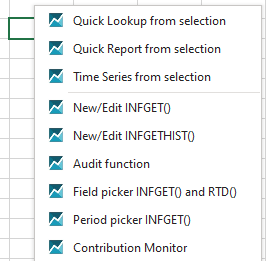
Some additional functionalities appear in the right-click menu:
-
Quick lookup from selection: convert a company name/ISIN code/ticker into a Company Code (Infront Analytics company identifier) via the company code lookup by selecting the values in the cells selected. Works either on empty cell.
-
Quick Report from selection: opens the Quick Report wizard using the company code(s) set in the cells selected. Works either on empty cell selection.
-
Time Series from selection: opens the Time Series wizard using the company code(s) set in the cells selected. Works either on empty cell selection.
-
New/Edit INFGET(): insert into Excel the INFGET() function from the dedicated panel or edit one preset INFGET() function from Excel into the dedicated panel.
-
New/Edit INFGETHIST(): insert into Excel the INFGETHIST() function from the dedicated panel or edit one preset INFGETHIST() function from Excel into the dedicated panel.
-
Audit function: get the audit trail on the function that has been inserted in the sheet. Works on INFGET() and INFCODECONVERT() functions.
-
Field picker: get the list of all available field items for the INFGET() and RTD() functions and pick the one you need.
-
Period picker: get the list of all available period or date parameter depending on the field set on the cell above or next to the one selected.
-
Contribution monitor: (Not available yet) monitor the different process of contribution (network latency, connection status, contribution logs, contribution throttling progress...).