
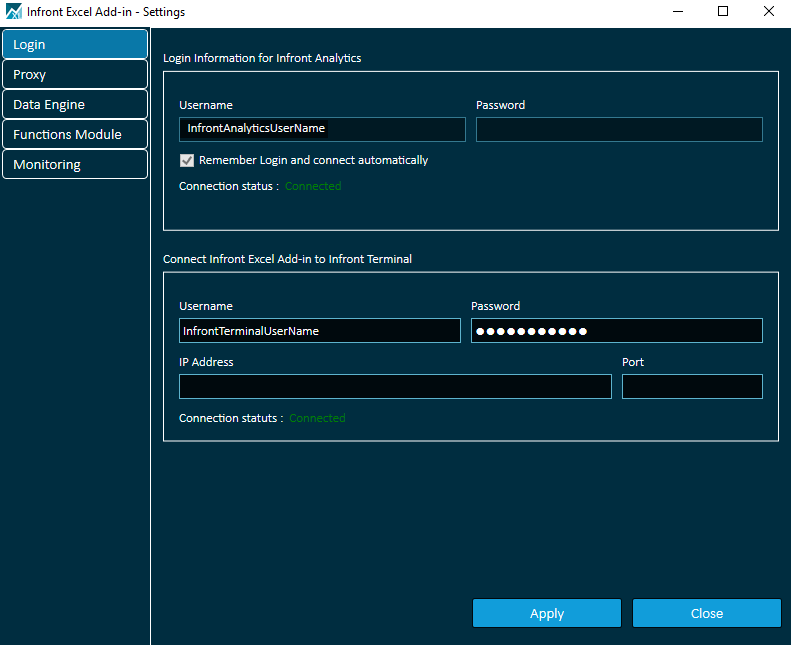
The login tab on the settings window has two sections:
-
one for Infront Analytics credentials
-
and one for the Infront Professional Terminal
Infront Analytics
This connection is mandatory to be able to use the Excel Add-in for Infront Professional Terminal and by default, the user is connected with his Infront Analytics credentials. Once logged in, he cannot modify the connection credentials.
This connection gives the user the access to the Infront Analytics data universe (companies, lists, fundamentals, estimates…).
Infront Professional Terminal
In addition to the mandatory default Infront Analytics connection, if the user is using the Excel Add-in for Infront Professional Terminal from the Infront Professional Terminal then he needs to connect with his Infront credentials that gives him also the access to the Infront data universe (instruments quotes, trading data…).
The IP configuration under Login Server in Infront Professional Terminal needs to be copied to the Excel Add-in for Infront Professional Terminal.
It can be done automatically by clicking on Import Terminal configuration.